
Can be activated in:
Detecting country…
Can be activated worldwide

PUBG Mobile UC Global
$1.15 $1,084.79Price range: $1.15 through $1,084.79

PayPal Payment
$1.15 $109.44Price range: $1.15 through $109.44
Know before you buy
- Global Server Top-up
- Direct Player ID Top-up
Delivery:
Usually 5–30 minutes after payment confirmation
Platform:
Supercell
Works on:
PC, Mobile
Access & fulfilment:
Player ID → Direct in-game top-up
Activation guide:
3 steps
Before you place the order 3 notes
-
Important: Please enter your correct Clash Royale Player Tag (including the # symbol). No Supercell ID login password required.
-
Provide your Clash Royale Player Tag (e.g. #2PQQCQV8). You can remain in-game during reload.
-
Valid for all Clash Royale accounts worldwide. Works seamlessly in Bangladesh and all other countries without any region restriction.
Product details 3 specs
- Estimated delivery
- Usually 5–30 minutes after payment confirmation
- Status
- In Stock & Ready for Direct Top-up
- Warranty
- Direct Top-up Guarantee
Delivery instructions
Gems or Pass will be credited directly to your Clash Royale in-game account. Restart the game to see the updated balance.
Warranty
100% authentic and official Supercell Gems guaranteed to reflect in your account.
Return/refund summary
Direct in-game top-ups are non-refundable once processed. If top-up fails due to server issues, contact our support with your order number.
Description
About Clash Royale
Clash Royale is a popular mobile strategy game developed and published by Supercell. It combines elements of collectible card games, tower defense, and multiplayer online battle arenas.
In Clash Royale, players build and upgrade their own deck of cards, which consists of various troops, spells, and buildings from the Clash of Clans universe. These cards are used to deploy units onto a small battlefield with two towers and a king tower on each side. The goal is to destroy more towers than the opponent within the time limit of three minutes (with extra time if there’s a tie).
To play, players use Elixir, which gradually replenishes during the match. Elixir is spent to deploy cards onto the battlefield. Each card has a different cost in Elixir, and players must strategize and manage their resources effectively to counter the opponent’s moves while protecting their own towers.
Clash Royale features a ranking system where players can climb the ladder and compete in various arenas as they earn trophies. As players progress, they unlock new cards, upgrade their existing ones, and join or create clans to interact with other players. Clans allow players to request and donate cards, participate in clan wars, and chat with fellow clan members.
The game also introduces events, challenges, and special game modes, which provide unique gameplay experiences and opportunities to earn rewards. Clash Royale is known for its competitive nature, with global tournaments and esports events organized by Supercell.
Overall, Clash Royale offers a mix of strategic gameplay, card collection, and multiplayer battles, making it a popular choice among mobile gamers worldwide.
About Clash Royale Gems
Gems are the premium currency that can be used to buy special offers, boost chest cycle timers, and purchase additional card upgrades and chests.
How to Obtain Clash Royale (CR) Gems
- You can now purchase Clash Royale Gems directly with UNISELV. UNISELV offers a convenient and quick way to top up gem for Clash Royale. With UNISELV, you can easily top up your CR gems using a variety of payment options. This allows you to swiftly acquire gems and enhance your gameplay experience in Clash Royale.
- Opening free and earned chests. Some chests contain gems as rewards.
- Completing certain achievements, challenges, and quests.
- Clan donations and clan war victories.
How to Spend Clash Royale Gems
- Buying special offers like value packs, tower skin deals, and emote bundles.
- Unlocking and upgrading emotes to taunt opponents.
- Boosting chest cycle timers to unlock chests more quickly.
- Buying special chests from the shop that offer better rewards.
How to top up Clash Royale Gems?
- Select the Gems denomination.
- Enter your Player Tag.
- Check out and select your payment method.
- Once payment is made, the Gems will be added to your account instantly.
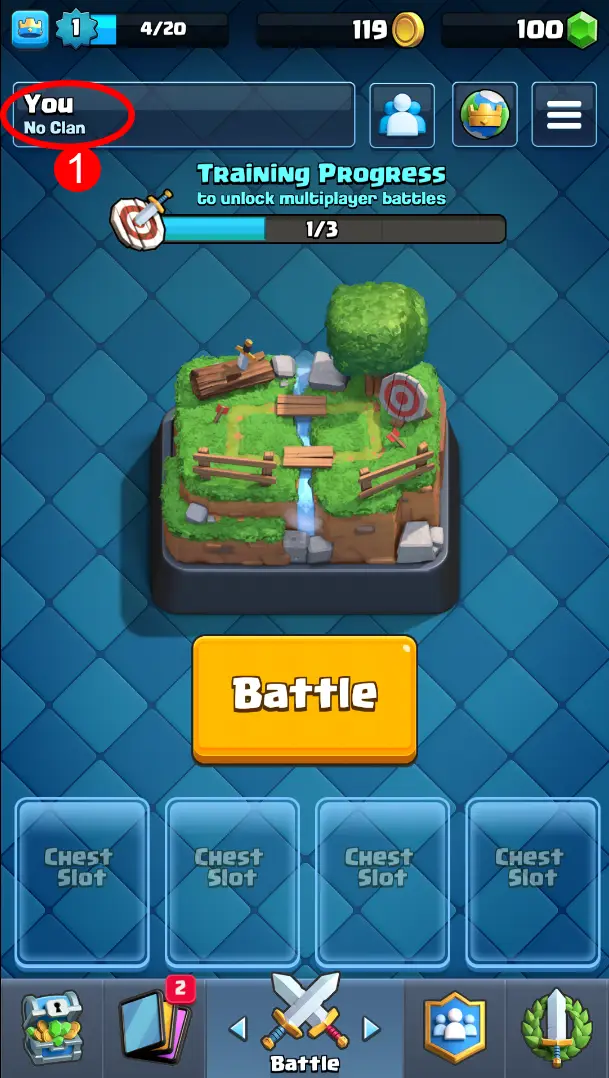
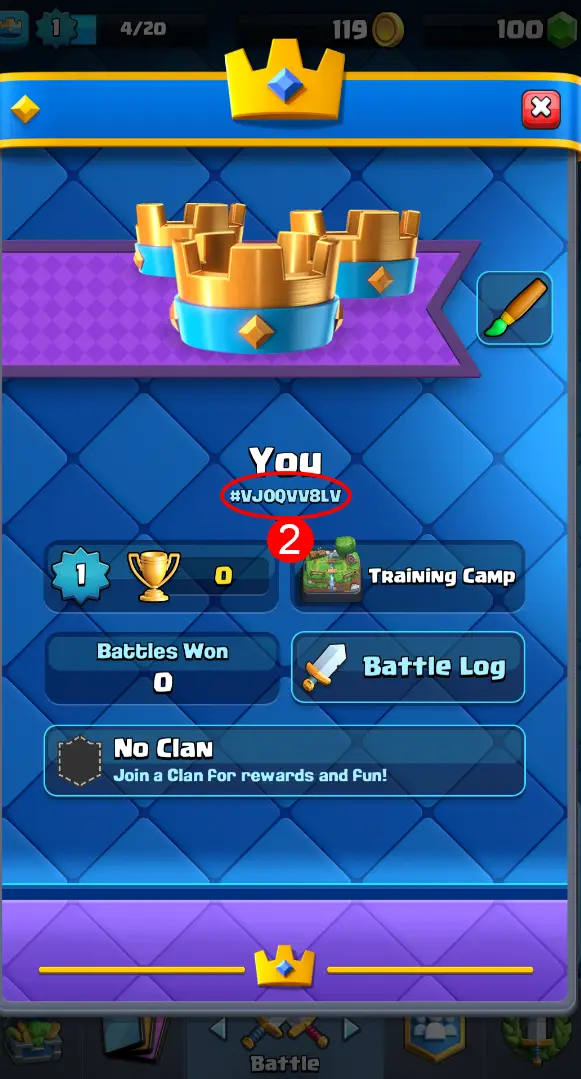
How to find Clash Royale Player Tag?
-
- Use your account login to the game.
- Click on your user name on the Battle tab.
- Your Player Tag will be displayed.
Reviews (0)
Related Products
-20%
Free Fire Diamond BD
$0.20 $62.50Price range: $0.20 through $62.50
Select options
This product has multiple variants. The options may be chosen on the product page
-20%
Free Fire Diamond BD (Auto Topup)
$0.20 $12.50Price range: $0.20 through $12.50
Select options
This product has multiple variants. The options may be chosen on the product page

Free Fire Diamond Global
$1.21 $78.01Price range: $1.21 through $78.01
Select options
This product has multiple variants. The options may be chosen on the product page

-8%
Yalla Ludo TopUp
$2.13 $544.00Price range: $2.13 through $544.00
Select options
This product has multiple variants. The options may be chosen on the product page

Reviews
Clear filtersThere are no reviews yet.